8 Best WiFi Calling Apps in 2026
Last updated May 4, 2026. Reviewed against current app support pages, pricing models, and Skype's 2025 shutdown.
A wifi calling app routes calls over the internet, but not every app does the same job. Some only call other app users. Others connect to real landlines and mobiles, which is what you need for client calls, banks, hotels, airlines, and international business calls. This guide focuses on the useful differences: whether the app can call real phone numbers, whether it needs phone-number registration, whether it works from a browser, and whether you can control caller ID.
Quick Answer: Best WiFi Calling Apps by Use Case
Best for calling real numbers: HelloAirDial or Viber Out
Best without phone registration: HelloAirDial
Best for caller ID control: HelloAirDial
Best for US second number: Google Voice
Best if both people use the same app: WhatsApp or Signal
Best Skype replacement: HelloAirDial or Viber Out
How We Chose These Apps
We ranked apps by the jobs business and international callers actually need: calling regular phone numbers, avoiding personal phone-number registration, calling from a laptop, choosing caller ID, checking prices before calling, and knowing whether the other person needs the same app.
That matters in 2026 because many older WiFi calling lists still recommend Skype or Google Duo. Skype retired on May 5, 2025, and Google Duo was folded into Google Meet, so neither should be treated as a normal standalone WiFi calling app today.
Best WiFi Calling App for Calling Real Phone Numbers
If you need to call clients, leads, banks, suppliers, or customer support lines, ignore app-only calling tools first. WhatsApp, Signal, Telegram, and FaceTime are useful when both people use the same app, but they cannot dial a normal business phone number.
HelloAirDial is the strongest fit for real phone-number calling because it works in a browser, reaches landlines and mobiles in 200+ countries, does not require phone registration to start, and lets you choose between a public caller ID, your verified number, or a virtual number.
Call real numbers
Reach landlines, mobiles, business lines, and support desks.
Use a browser
No desktop app, mobile app, SIP client, or carrier plan needed.
Control caller ID
Use a public number, verify your own, or buy a virtual number.
Best WiFi Calling Apps: Quick Comparison
| App | Calls Real Numbers | No Phone Registration | Works in Browser | Pricing |
|---|---|---|---|---|
| HelloAirDial | ✅ Yes, 200+ countries | ✅ Email only | ✅ Yes | From $0.02/min |
| Google Voice | ✅ Yes, US/CA free | ❌ US number required | ✅ Yes | Free (US) |
| Viber | ✅ Yes (Viber Out) | ❌ Phone required | ❌ Desktop app | From ~$0.01/min |
| TextNow | ✅ Yes, US/CA | ❌ Provides a number | ✅ Yes | Free (ads) |
| ❌ App users only | ❌ Phone required | ❌ Calls require app | Free | |
| Telegram | ❌ App users only | ❌ Phone required | ✅ Yes | Free |
| Signal | ❌ App users only | ❌ Phone required | ❌ Desktop app | Free |
| FaceTime | ❌ Apple users only | ❌ Apple ID required | ❌ No | Free |
Built-In WiFi Calling vs WiFi Calling Apps
People use the phrase "WiFi calling" for two different things. Native WiFi calling is your carrier's feature inside iPhone or Android settings. It uses your existing mobile number and phone plan, usually requires an active SIM or eSIM, and may still bill international calls at carrier rates.
WiFi calling apps are separate services that use the internet to carry your voice. Some, like WhatsApp, Signal, Telegram, and FaceTime, only call other app users. Others, like HelloAirDial, Google Voice, TextNow, and Viber Out, can connect to regular landlines and mobiles through the phone network.
| Feature | Native WiFi Calling | WiFi Calling App |
|---|---|---|
| Requires SIM or carrier plan | Usually yes | Not always |
| Uses your existing number | Yes | Depends on the app |
| Calls regular phone numbers | Yes | Only some apps |
| International pricing | Carrier plan rates | App-specific rates or free app-to-app |
If you want the carrier feature, check your phone settings. If you want to call without a SIM card, call from a laptop, or avoid carrier international rates, use an internet calling service instead.
WiFi Calling App Without Phone Number for Business Calls
Most wifi calling apps require a phone number to register. WhatsApp, Signal, Viber, and Telegram all need SMS verification before you can make a call. If you need to call prospects, clients, or vendors without attaching your personal mobile number to every call, HelloAirDial is the strongest option available.
- ✓ Sign up with email and call from a browser
- ✓ Call real landlines and mobiles, not just app users
- ✓ Start with the public caller ID, then verify your number later if needed
- ✓ Works well for laptop-based sales, support, and international follow-up calls
This is useful when you want the speed of a browser-based web dialer without asking every team member to install and manage another phone app.
Best WiFi Calling Apps for Caller ID Control
When calling banks, clients, or businesses that identify you by caller ID, displaying your real number matters. Several apps let you show your actual phone number on outbound calls rather than a random service number.
1. HelloAirDial
HelloAirDial lets you verify your existing mobile number once and use it as your outbound caller ID. The recipient sees your real number, not an unfamiliar app number. It also gives you the opposite option when privacy matters: call with the public caller ID and skip phone-number registration entirely.
Best for: calling real landlines and mobiles from a browser while choosing whether to show your own number.
2. Viber Out
Viber Out can display your verified phone number when you call regular phone numbers. It is a good fit if you already use Viber and don't mind installing the mobile or desktop app.
Tradeoff: phone registration and app install are required.
3. Native carrier WiFi calling
Built-in WiFi calling on iPhone or Android uses your normal mobile number because it is part of your carrier service. This is the cleanest option for domestic calls when you already have an active SIM or eSIM.
Tradeoff: international calls usually follow your carrier's pricing, and it won't help if you need to call without a SIM card.
4. Google Voice and TextNow
Google Voice and TextNow are useful when you want a dedicated second number, but they don't usually show your existing mobile number as caller ID. They assign or sell you another number instead.
Best for: separating business or personal calls under a new number.
 1. HelloAirDial
Best WiFi Calling App Without Phone Registration, Works From Any Browser
HelloAirDial is a browser-based wifi calling app that lets you make calls without downloading any software. It uses WebRTC technology to securely place calls directly from any device with a modern browser and internet connection. Uniquely, it offers both options: use it as a wifi calling app without phone number verification, or verify your own number to function as a wifi calling app that uses your number for caller ID.
It is the only option in this comparison that works as both a wifi calling app without a phone number AND a wifi calling app that uses your own number, depending on how you configure it.
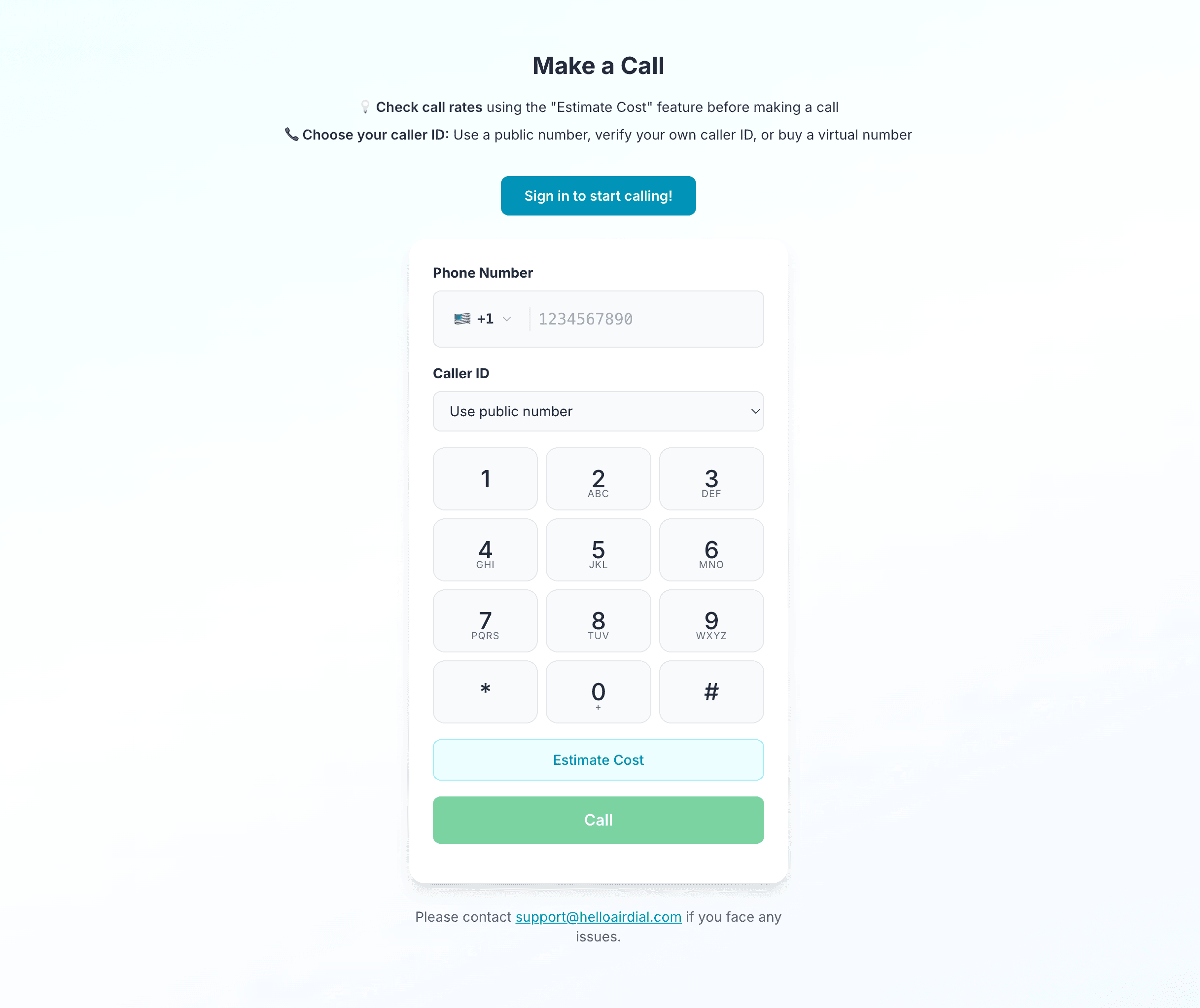
How It Works:
- • Open the homepage and create a free account with just an email address
- • Start making calls directly from your browser
- • No phone number registration required: calls can be placed using HelloAirDial's public number
- • Optionally verify your own number to use it as outgoing caller ID
- • Call from anywhere to any phone number worldwide (landlines and mobiles)
- • Transparent per-minute pricing with no connection fees
Strengths:
- ✓ No app installation required, works in any modern browser
- ✓ Flexible phone number options: use without registration, or verify your own number for caller ID
- ✓ Calls any phone number (landlines and mobiles), not just app users
- ✓ Pay-as-you-go pricing with no hidden fees or credit expiration
- ✓ Every new user gets a free call online to test audio quality before adding funds
- ✓ Transparent rate calculator shows cost before you call
- ✓ Purchase a virtual US/Canada number for your business needs and also receive incoming voicemails
Limitations:
- – Requires stable internet connection for best quality
- – No messaging or social features, focused purely on calling
Best For: Anyone who wants to make a phone call online without downloading apps, privacy-conscious users who prefer to call without a SIM or phone number registration, and business professionals who need a quick way to call from their laptop.
 2. Google Voice
Virtual Phone System for US Users
Google Voice provides users with a free US phone number that can make and receive calls over WiFi, functioning as a complete virtual phone system rather than just a calling app. It works closely with Google services, offering features like voicemail transcription and spam filtering.
How It Works:
After signing up with a Google account, you select a US phone number from available options. This number can receive calls on any device where you're signed into Google Voice: smartphone, tablet, or computer. Outgoing calls to US and Canadian numbers are free, while international calls use competitive per-minute rates.
For business users, Google Voice is now primarily sold as a Google Workspace add-on with paid plans. Personal Google Voice remains useful for eligible US users, but availability and setup requirements are narrower than many search results imply.
Strengths:
- ✓ Free US phone number with no monthly fees
- ✓ Free unlimited calls to US and Canada
- ✓ Voicemail transcription converts messages to text
- ✓ Spam call filtering using Google's detection algorithms
- ✓ Works across all devices through apps and web interface
- ✓ Can forward calls to your existing phone number
Limitations:
- – Primarily available only in the United States
- – Requires an existing US phone number for verification during setup
- – International rates, while reasonable, aren't the lowest available
- – Limited customer support for free accounts
Best For: US residents who need a secondary phone number for business, privacy, or organizing their communications, particularly those already using Gmail, Google Calendar, and Google Workspace.
Google Voice is only available to US-based users. If you are outside the US, see our Google Voice alternatives, Google Voice UK, Google Voice Canada, or Google Voice Australia guides.
 3. Viber
Global Messaging Platform with PSTN Calling
Viber combines free messaging and calling between users with "Viber Out," a feature that allows calling any phone number worldwide at competitive rates. With over one billion registered users across 190 countries, it offers a balance between free app-to-app communication and paid PSTN connectivity.
How It Works:
Viber-to-Viber calls are free and use your internet connection. For calling regular phone numbers, you purchase Viber Out credit or subscribe to an unlimited calling plan for specific countries. The app syncs with your phone's contacts and indicates which contacts have Viber installed.
Strengths:
- ✓ Free HD voice and video calls between Viber users
- ✓ Viber Out provides low-cost calls to any phone number globally
- ✓ Unlimited calling plans available for frequently-called countries
- ✓ Group calls support up to 50 participants
- ✓ Available on iOS, Android, Windows, Mac, and Linux
- ✓ Caller ID displays your real number when using Viber Out
Limitations:
- – App is feature-heavy with stickers, games, and ads in the free version
- – Contact syncing uploads your address book to Viber's servers
- – Rates for some destinations are higher than specialized VoIP providers
- – Both parties need Viber for free calls
Best For: Users who want both free app-to-app calling and the flexibility to call regular phone numbers when needed, especially those with contacts spread across multiple countries.
 4. Telegram
Privacy-First Messaging with High-Quality Voice Calls
Telegram has emerged as a popular alternative to mainstream messaging apps, offering secure voice calls with end-to-end encryption alongside its messaging features. Telegram passed 1 billion monthly active users in 2025, giving it enough reach to be practical in many regions while still appealing to users who want more privacy controls than a standard carrier call offers.
How It Works:
After creating an account using your phone number, you can make free voice and video calls to other Telegram users over WiFi or mobile data. All calls use end-to-end encryption that can be verified by comparing four emojis displayed on both devices during the call. Telegram uses machine learning algorithms that adapt to network conditions in real-time, optimizing audio quality based on bandwidth availability.
Strengths:
- ✓ End-to-end encryption for all voice calls with visual verification
- ✓ AI-powered audio optimization adjusts to network conditions automatically
- ✓ Peer-to-peer connections when possible for minimal latency
- ✓ Group voice calls support up to 200 participants
- ✓ "Use Less Data" mode reduces bandwidth consumption by 25 to 30%
- ✓ Available on iOS, Android, Windows, Mac, Linux, and web browsers
- ✓ Open-source clients allow security audits
- ✓ No advertisements
Limitations:
- – Can only call other Telegram users (no PSTN calling to regular phone numbers)
- – Requires phone number for registration
- – Smaller user base than WhatsApp in some regions
- – Some advanced features require learning the interface
Best For: Users who value privacy and want high-quality voice calls with strong encryption, particularly those communicating internationally with others who prioritize security. Excellent for groups needing secure conference calls with many participants.
 5. Signal
Privacy-Focused WiFi Calling
Signal has earned a reputation as the gold standard for secure communication, recommended by privacy advocates and security researchers. Its wifi calling feature provides encrypted voice calls that cannot be intercepted or monitored, even by Signal itself.
How It Works:
Signal uses end-to-end encryption for all communications, including voice and video calls. The app is open source, meaning its code is publicly available for security audits. Signal collects minimal user data (only your phone number) and doesn't store message content or call logs on its servers.
Strengths:
- ✓ Industry-leading privacy and security with end-to-end encryption
- ✓ Open source code allows independent security verification
- ✓ Non-profit organization with no advertising or data selling
- ✓ Voice and video calls available on iOS, Android, and desktop
- ✓ Group calls support up to 75 participants
- ✓ Disappearing messages feature for additional privacy
Limitations:
- – Can only call other Signal users (no PSTN calling)
- – Smaller user base than WhatsApp or Viber
- – Requires phone number for registration
- – Some features (like backups) are less polished than mainstream competitors
Best For: Users who prioritize privacy above all else and communicate with others who share this priority. Particularly valuable for journalists, activists, business professionals handling sensitive information, or anyone concerned about surveillance.
 6. FaceTime Audio
Built-In Calling for Apple Users
FaceTime Audio comes pre-installed on every iPhone, iPad, and Mac, providing high-quality voice calls without requiring any additional downloads or account setup. For users who already live on Apple devices, it is the lowest-friction wifi calling experience available.
How It Works:
FaceTime uses your Apple ID and internet connection to place calls to other Apple device users. The service integrates directly with the Phone app on iPhone, making it nearly indistinguishable from regular cellular calls. When calling another Apple user over WiFi, your device may automatically use FaceTime Audio for better quality.
Strengths:
- ✓ No setup required, works immediately on Apple devices
- ✓ Exceptional audio quality using AAC-LD codec
- ✓ End-to-end encryption for all calls
- ✓ Built into Contacts and Phone apps
- ✓ Group FaceTime supports up to 32 participants
- ✓ SharePlay allows watching videos or listening to music together during calls
Limitations:
- – Only works between Apple devices, cannot call Android users or regular phone numbers
- – Android and Windows users can join FaceTime links in a browser, but cannot start normal FaceTime calls
- – Requires both parties to have Apple ID
- – No option for calling landlines or mobile numbers directly
Best For: iPhone and Mac users who primarily communicate with others using Apple devices. It is the most convenient option when both parties use Apple hardware.
 7. TextNow
Free Phone Number with WiFi Calling
TextNow provides a free US or Canadian phone number along with unlimited calling and texting within North America. Unlike apps that only work user-to-user, TextNow functions as an actual phone service, capable of calling any phone number.
How It Works:
Download the app, create an account, and receive a real phone number. Make unlimited free calls and texts to US and Canadian numbers over WiFi or data. The service is ad-supported, so you'll see advertisements within the app unless you upgrade to a paid plan that removes them.
Strengths:
- ✓ Free real phone number (US or Canada)
- ✓ Unlimited free calls and texts within US and Canada
- ✓ Works on iOS, Android, tablets, and computers
- ✓ Can call any phone number, not just app users
- ✓ Optional SIM card for cellular connectivity when WiFi unavailable
- ✓ Voicemail included
Limitations:
- – Free version is ad-supported with frequent advertisements
- – International calling requires purchasing credits at additional cost
- – Call quality depends heavily on internet connection
- – Phone number may be recycled if inactive for extended periods
- – Some users report their TextNow numbers being flagged as potential spam
Best For: Users in the US or Canada who need a free secondary phone number, students, or anyone looking to reduce their phone bill for domestic calling without paying for a traditional phone plan.
 8. WhatsApp
Cross-Platform Messaging with WiFi Calling
WhatsApp has evolved from a simple messaging app into one of the most widely used wifi calling apps globally, with over two billion users. Its voice and video calling features are built directly into the messaging interface, making it a natural choice for users who already communicate through the platform.
How It Works:
WhatsApp uses your phone's internet connection to place voice and video calls to other WhatsApp users. Calls are protected with end-to-end encryption, meaning that WhatsApp itself cannot listen to your conversations. The app is available on iOS, Android, and desktop (Windows and Mac), with call quality that adapts automatically to network conditions.
Strengths:
- ✓ Massive global user base increases the likelihood that your contacts already have the app
- ✓ End-to-end encryption for all calls and messages
- ✓ Group calling supports up to 32 participants
- ✓ Works on WiFi, 4G, and 5G connections
- ✓ No separate account creation, uses your existing phone number
Limitations:
- – Cannot call regular phone numbers (landlines or mobiles without WhatsApp)
- – Requires a phone number for registration
- – Voice and video calls on desktop require the WhatsApp desktop app, not WhatsApp Web in a browser
Best For: Users who want to call friends and family who already use WhatsApp, particularly for international communication where both parties have the app installed.
WhatsApp cannot call landlines or regular mobile numbers. If you need to reach a real phone number rather than another app user, HelloAirDial or Viber Out are the better options.
Why Skype and Google Duo Are Not on This List
A lot of older WiFi calling app roundups still list Skype and Google Duo. That is outdated. Microsoft retired Skype on May 5, 2025, and directed users to Microsoft Teams Free. Remaining Skype paid telephony access is limited to users with existing paid services, so it is not a normal app recommendation for new users in 2026.
Google Duo was merged into Google Meet. Google Meet is useful for video meetings and app-to-app calls, but it is not a direct replacement for calling landlines and mobile numbers over WiFi. If you are replacing Skype Credit or Skype Number, see our Skype alternatives guide.
When to Use a WiFi Calling App to Call Real Phone Numbers
Use a WiFi calling app when the call needs to reach a normal phone number and your regular mobile plan is the wrong tool for the job.
Use WiFi calling when:
- • You need to call clients from a laptop: A browser-based service lets you use a headset and keyboard without installing a softphone.
- • You need to call landlines or mobiles abroad: App-only tools like WhatsApp, Signal, Telegram, and FaceTime do not reach normal phone numbers.
- • You do not want to register a personal number: HelloAirDial can start with email signup and a public caller ID.
- • You need recognisable caller ID: HelloAirDial and Viber Out can show a verified number when the recipient needs to know who is calling.
- • Your carrier international rates are too high: Check app rates against your destination before calling, especially for frequent overseas calls.
Stick with cellular when:
- • You're moving between locations: Cellular networks handle tower handoffs better, while WiFi connections drop when you leave a network
- • In emergency situations: Cellular 911 calls are more reliable and transmit location data
- • WiFi is unstable or congested: A weak cellular signal often provides better call quality than congested public WiFi
WiFi Calling vs Cellular: Quick Comparison
| Factor | WiFi Calling | Cellular |
|---|---|---|
| Indoor coverage | Better (WiFi penetrates walls) | Often weak in buildings |
| International calls | Often cheaper, check destination rates | Expensive roaming fees |
| Emergency calls (911) | Limited support | Reliable with location data |
| On the move | Drops when leaving network | Better tower handoffs |
| Audio quality | HD on strong connection | Consistent but standard |
Frequently Asked Questions
What is the best wifi calling app for international calls?
For calling other app users internationally, WhatsApp, Telegram, and Viber offer free high-quality calls with large global user bases. For calling regular phone numbers (landlines and mobiles), services like HelloAirDial and Viber Out provide competitive rates typically ranging from $0.01 to $0.10 per minute depending on the destination.
Can I use wifi calling apps without a phone number?
Most wifi calling apps require a phone number for registration (WhatsApp, Signal, Viber, Telegram). However, browser-based services like HelloAirDial only require an email to create an account. If you're looking for a wifi calling app without phone number requirements, HelloAirDial is your best option: no phone verification is needed to start making calls to regular phone numbers.
Is there a wifi calling app that uses your number for caller ID?
Yes, several options exist. Viber Out displays your verified mobile number to recipients when calling regular phone numbers. HelloAirDial also functions as a wifi calling app that uses your number: you can optionally verify your own phone number and use it as caller ID for outgoing calls, giving you the flexibility to either call anonymously using the service's public number or display your real number when needed. Google Voice and TextNow provide you with a new dedicated number rather than using your existing one.
Do wifi calling apps work without WiFi?
Yes, despite the name, these apps work on any internet connection, including mobile data (4G/5G). "WiFi calling" refers to the technology (VoIP) rather than a requirement to use WiFi specifically. However, using mobile data for calls will consume your data allowance.
Can I make business calls over WiFi without using my personal phone number?
Yes. HelloAirDial lets you make business calls over WiFi from a browser using a public caller ID, a verified number you own, or a dedicated virtual number. That means you can call clients without installing a mobile app or exposing your personal number by default.
What's the difference between native WiFi calling and wifi calling apps?
Native WiFi calling is a carrier feature built into your phone that routes your regular calls over WiFi when cellular signal is weak. It uses your existing number and calling plan. Wifi calling apps are separate applications that provide their own calling functionality, often with different numbers and separate billing.
Do wifi calling apps support emergency calls (911)?
Most wifi calling apps do not reliably support emergency services. Cellular calls automatically transmit your location to emergency dispatchers, while VoIP calls may not. For emergencies, use your phone's native cellular calling capability when possible.
Can I call landlines and mobiles over WiFi without the other person installing an app?
Yes, but only with apps that connect to the public phone network. HelloAirDial, Viber Out, Google Voice, and TextNow can call regular phone numbers. WhatsApp, Signal, Telegram, and FaceTime only call users on the same app.
Which WiFi calling app lets me choose between public caller ID and my own number?
HelloAirDial is the most flexible option here. You can call with the shared public number when you do not want to register a phone number, or verify your existing number and show it as caller ID when recognition matters.
What is the best WiFi calling app for laptop or PC?
HelloAirDial is the strongest option for calling from a laptop or PC because it works entirely in a web browser with no download or installation, making it the most accessible wifi calling app for desktop use. You open a browser tab, sign in, and call any number in the world. Google Voice also supports browser calling for eligible US users. Viber, WhatsApp, Telegram, and Signal have desktop apps, but their browser support is limited or focused on app-to-app calling rather than calling regular phone numbers.
Can I use a WiFi calling app for international calls?
Yes. HelloAirDial supports calls to landlines and mobiles in 200+ countries from $0.02 per minute with no subscription required. Viber Out also covers international numbers at competitive rates. Google Voice supports international calling from US accounts but is not available outside the US. WhatsApp, Signal, and Telegram support free international calls between app users but cannot call international phone numbers directly.
Call Real Phone Numbers Over WiFi, No Phone Registration Required
HelloAirDial lets you call any landline or mobile in the world directly from your browser. No app to download, no SIM card, no phone registration. Sign up with your email, check the rate, and place client, supplier, or international follow-up calls from your laptop.