Manual Dialer
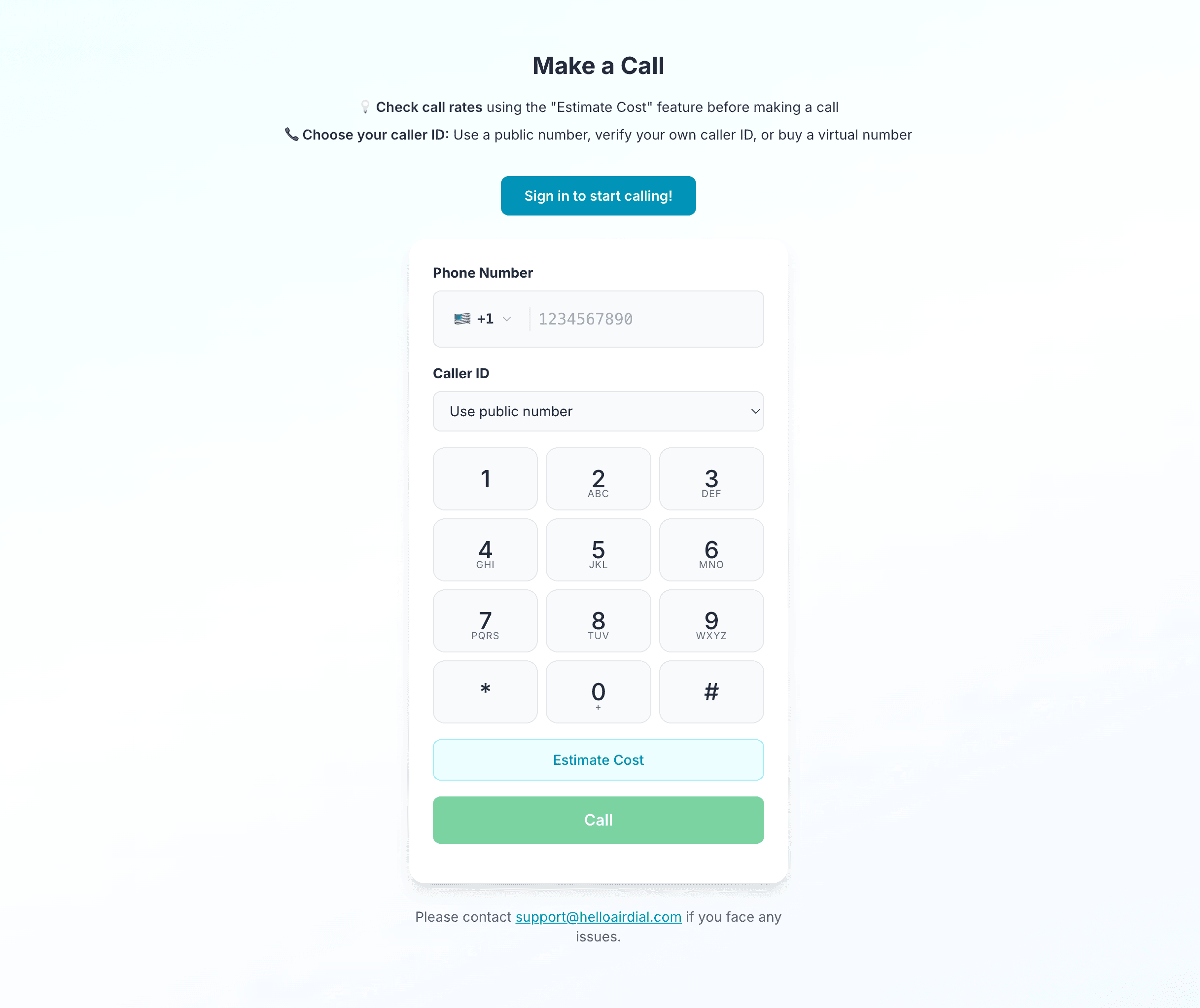
A manual dialer gives you control over which number to call and when to start. With HelloAirDial, you enter or paste a number, select an available caller ID, and place the call from your browser. Each call is started manually rather than processed through an automatic contact list.
What is a manual dialer?
With a manual dialer, the user chooses the contact and starts each outbound call. The software does not automatically move through a calling list or place several calls at once. This gives the user control over who to call and when the call begins.
How does a manual dialer work?
The caller prepares for one contact at a time and decides when each call begins. A typical workflow has four steps.
- 1
Review the contact
Check who you are calling and decide what you need to cover before the call starts.
- 2
Enter the number
Type or paste the mobile or landline number using the correct country code.
- 3
Choose your caller ID
Select an available caller ID and start the call when you are ready.
- 4
Record the outcome
Save relevant notes after the conversation so the next follow-up has context.
Best suited to
Focused calls where the caller needs time to review context and control the pace.
Not suited to
High-volume campaigns that depend on automatic list dialing or several calls at once.
Manual dialer vs auto dialer: which should you use?
The main difference is who initiates the call. A manual dialer waits for the caller. An auto dialer starts calls from a prepared list according to its campaign settings.
| Consideration | Manual dialer | Auto dialer |
|---|---|---|
| Who starts each call | The caller | The software |
| Call preparation | Before each call | Usually at campaign setup |
| Calling volume | Lower | Higher |
| Pacing | Controlled by the caller | Controlled by campaign settings |
| Best fit | Focused outreach | Repetitive campaigns |
When Should You Use a Manual Dialer?
Manual dialing fits calls where preparation and individual control matter more than total volume.
- 1
Personalized sales outreach
The caller can review the prospect, recent activity, and purpose of the call before dialing. This gives them time to prepare a relevant opening instead of moving immediately to the next name on a list.
- 2
Recruiting calls
Recruiters can check the role requirements and candidate history before starting the conversation. They can also confirm the candidate's location and call at an appropriate local time.
- 3
Client follow-ups
The caller can review earlier notes and any commitments made during the previous conversation. They can then place the follow-up at the agreed time and record the new outcome.
- 4
Small or irregular campaigns
Manual dialing works well when a team has a short list or makes calls only when a specific need arises. There is no automated queue to configure before the first call.
When Should You Use an Auto Dialer?
Automated dialing fits structured campaigns where a team needs to move through many contacts efficiently.
- 1
Large contact lists
An auto dialer can pull numbers from a prepared list and initiate calls according to campaign settings. This reduces repeated number entry when a team needs to make many contact attempts.
- 2
Less time between calls
Automation can start the next call after an agent finishes the previous one. This is useful when reducing idle time is more important than choosing the timing of every call.
- 3
Power or predictive dialing
Power dialers move through a list one number at a time, while predictive dialers may place several calls based on agent availability. These modes are designed for teams that prioritize calling volume.
- 4
Repeatable campaigns
Automated dialing fits campaigns with a consistent contact list and a defined process for each outcome. Campaign settings can reduce repeated work across a larger team.
Neither method is the right choice for every team. Match the dialing method to the number of calls, the preparation each call requires, and the workflow your team must follow.
How HelloAirDial works as a manual dialer
HelloAirDial combines manual call control with browser-based calling. The user enters a number and checks the rate before deciding when to place the call.
Browser-based calling
Sign in and place calls without installing a desktop dialer. The browser handles the calling session after you allow microphone access.
Caller ID options
Choose from the caller IDs available to your account. You can verify a number you own or purchase an optional US or Canada virtual number.
Rate check before calling
Use the destination rate estimator before starting a call. This helps you understand the per-minute cost for the number you entered.
Call notes and history
Save notes after a conversation and review them with the call record. This keeps useful context available for a later follow-up.
Team calling
Team plans support shared credit and member usage tracking. Call recording is also available for review when it is enabled.
International reach
Use one account to call destinations in more than 200 countries. The per-minute rate changes according to the number being called.
Pricing and practical limitations
Pricing
The basic manual calling workflow does not require a monthly software subscription. Add credit from $5 and pay the displayed per-minute rate for the destination you call.
- Rates start from $0.02 per minute
- Credits do not expire
- No seat minimum for individual calling
Review the rate for a specific destination before calling, or see the available top-up and team options.
What it does not do
HelloAirDial is designed for individually initiated calls. It is not a replacement for a call-center platform when automated throughput is the main requirement.
- No automatic list dialing
- No power or predictive dialing
- No parallel calling
- No automated sales sequence or deep CRM workflow
Is a manual dialer right for your team?
A manual dialer is worth considering when most of the following statements describe your calling workflow.
- Each call has a specific contact or purpose.
- The caller needs time to review context before dialing.
- Call volume changes between weeks or months.
- Your team does not need automatic list processing.
- You prefer usage-based costs over a monthly dialer subscription.
If your team needs to process a large list with minimal time between calls, compare the other outbound dialer types before choosing.
Frequently Asked Questions
What is a manual dialer?
A manual dialer lets the user choose a number and start each call. It does not automatically move through a contact list or place several calls at once.
What is the difference between a manual dialer and an auto dialer?
A manual dialer waits for the caller to initiate each call. An auto dialer starts calls from a prepared list according to campaign settings. Manual dialing gives the caller more control, while automated dialing supports higher call volume.
Is a manual dialer the same as a web dialer?
No. Manual describes how a call is initiated, while web describes where the dialer runs. A product can be both. HelloAirDial is a manual dialer that runs in a web browser.
Can a manual dialer be used for cold calling?
Yes. Manual dialing can suit focused cold outreach because the caller can review the prospect before each call. The caller remains responsible for the calling, consent, identification, and recording rules that apply to the campaign.
Does HelloAirDial automatically dial a contact list?
No. HelloAirDial does not provide automatic list dialing, predictive dialing, power dialing, or parallel calling. The user starts every call manually.
Can a team use the manual dialer?
Yes. Team plans support a shared credit balance, usage tracking, call notes, and call recording when enabled. Each team member still initiates their own calls.
How much does the HelloAirDial manual dialer cost?
The basic calling workflow does not require a monthly dialer subscription. Top-ups start at $5, and calls are charged by the destination at the displayed per-minute rate.
Related Resources
No automatic list dialing. Pay only for the minutes you use.