Tips & Guides22 min read

WebRTC Technology Explained: How Real-Time Communication Works

Learn what WebRTC is, how it works, and why it powers modern voice and video calling. Discover use cases, technical architecture, and how HelloAirDial uses WebRTC for crystal-clear international calls.

R

Ronak Lakhotia

Not long ago, making a video call required dedicated software, browser plugins, or expensive conferencing systems, but WebRTC changed that. This open-source technology enables real-time voice, video, and data communication directly in your web browser, without any plugins or downloads. Today, billions of people use WebRTC through services like Google Meet, Discord, and Facebook Messenger, often without even realizing it.

In this guide, we'll cover what WebRTC is, how it works under the hood, when to use it, and how we use it at HelloAirDial to deliver crystal-clear international calls from your browser.

Table of Contents

What Is WebRTC?

WebRTC (Web Real-Time Communication) is an open-source project that lets browsers and mobile apps communicate in real-time. It handles audio, video, and data transfer directly between devices, without needing any plugins or third-party software.

Google originally developed it, and now it's standardized by the World Wide Web Consortium (W3C) and the Internet Engineering Task Force (IETF). WebRTC gives browsers built-in capabilities for:

  • Voice calling - High-quality audio communication
  • Video conferencing - Real-time video streaming between participants
  • Screen sharing - Share your desktop or application windows
  • Data transfer - Send files and data directly peer-to-peer
  • Live streaming - Broadcast audio/video to multiple people

Key Characteristics of WebRTC

FeatureDescription
Open SourceFree to use, no licensing fees
Plugin-FreeWorks natively in modern browsers
Peer-to-PeerDirect connection between users when possible
EncryptedSecurity is mandatory, built right into the protocol
Cross-PlatformWorks on desktop, mobile, and embedded devices
Low LatencyOptimized for real-time communication

Brief History

  • 2011: Google acquires GIPS (Global IP Solutions) and open-sources the technology
  • 2012: First WebRTC-enabled Chrome browser released
  • 2017: WebRTC 1.0 specification reaches Candidate Recommendation status
  • 2021: WebRTC 1.0 becomes an official W3C Recommendation
  • 2024: Over 8 billion WebRTC-capable browser instances worldwide

For the official specification, check out the W3C WebRTC 1.0 Recommendation.

Technical Architecture of WebRTC

Understanding how WebRTC establishes and maintains connections helps you appreciate why it has become the backbone of modern communication apps.

The Three Main Components

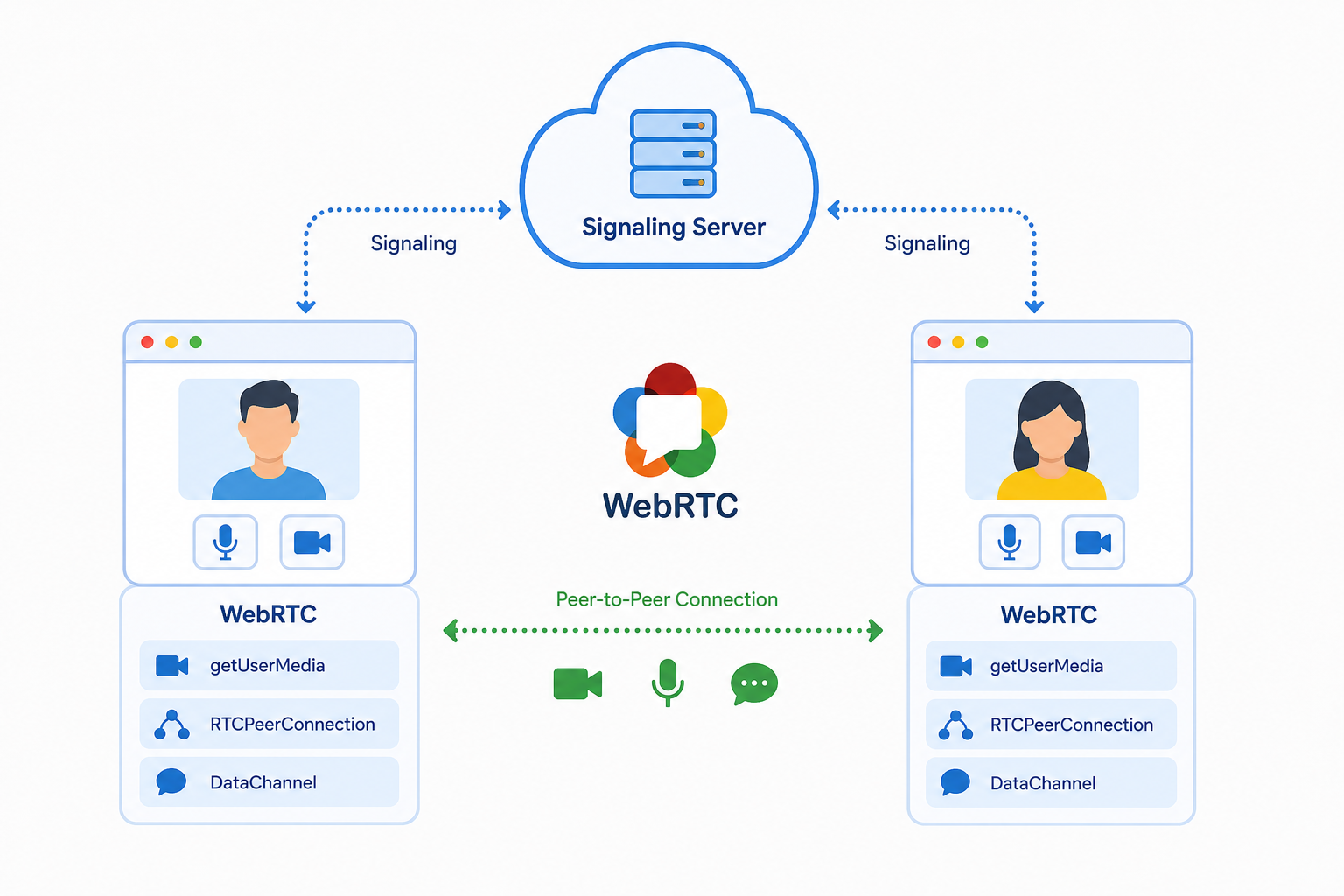
WebRTC consists of three primary JavaScript APIs:

  1. MediaStream (getUserMedia) - Captures audio and video from your device's microphone and camera
  2. RTCPeerConnection - Handles the peer-to-peer connection, including encoding, encryption, and network traversal
  3. RTCDataChannel - Enables bidirectional data transfer between peers

Connection Establishment: The WebRTC Handshake

Setting up a WebRTC connection involves several steps, often called the "signaling" process:

StepActionDirection
1Create Offer (SDP)Caller → Callee
2Create Answer (SDP)Callee → Caller
3Exchange ICE CandidatesBidirectional
4Direct P2P Connection EstablishedConnected

Session Description Protocol (SDP)

SDP is a text-based format that describes multimedia communication sessions. It includes:

  • Supported audio/video codecs
  • Network information
  • Encryption keys
  • Media capabilities

The IETF RFC 8866 defines the SDP format used in WebRTC.

ICE, STUN, and TURN: Navigating Network Complexity

One of the trickiest parts of WebRTC is establishing connections when users are behind NAT (Network Address Translation) or firewalls.

ICE (Interactive Connectivity Establishment) is the framework that figures out the best connection path:

ComponentPurposeWhen Used
STUNDiscovers your public IP and portMost connections (80-90%)
TURNRelays media when direct connection failsRestrictive networks (10-20%)

STUN (Session Traversal Utilities for NAT):

  • Free servers that help peers discover their public-facing IP addresses
  • Enables direct peer-to-peer connections in most cases
  • Low latency since data flows directly between peers

TURN (Traversal Using Relays around NAT):

  • Relay servers that forward media when direct connection is impossible
  • Required for restrictive corporate firewalls or symmetric NATs
  • Adds some latency but ensures you can still connect

For more details, see RFC 8445 (ICE), RFC 5389 (STUN), and RFC 5766 (TURN).

Audio and Video Codecs

WebRTC supports several codecs for encoding and decoding media:

Audio Codecs:

CodecBitrateLatencyUse Case
Opus6-510 kbpsVery LowDefault for voice/music (mandatory in WebRTC)
G.71164 kbpsVery LowPSTN compatibility
G.72248-64 kbpsLowWideband voice

Video Codecs:

CodecEfficiencyHardware SupportNotes
VP8GoodWidespreadMandatory in WebRTC, royalty-free
VP9BetterGrowingBetter compression, royalty-free
H.264GoodExcellentHardware acceleration common
AV1BestEmergingNext-gen, royalty-free

The Opus codec is particularly impressive. It adapts from narrowband speech to full-bandwidth stereo music and handles packet loss gracefully.

Built-in Security

WebRTC mandates encryption for all communications:

  • DTLS (Datagram Transport Layer Security): Secures the key exchange, similar to TLS for web traffic
  • SRTP (Secure Real-time Transport Protocol): Encrypts the actual audio/video streams

Every WebRTC call is encrypted end-to-end by default. You can't even disable it, which is actually a big security advantage over traditional phone systems.

How a WebRTC Call Actually Works

Understanding how your voice travels from your browser to someone's phone helps explain why WebRTC is so effective. Here's what happens step by step:

Step 1: Your Browser Asks for Permission

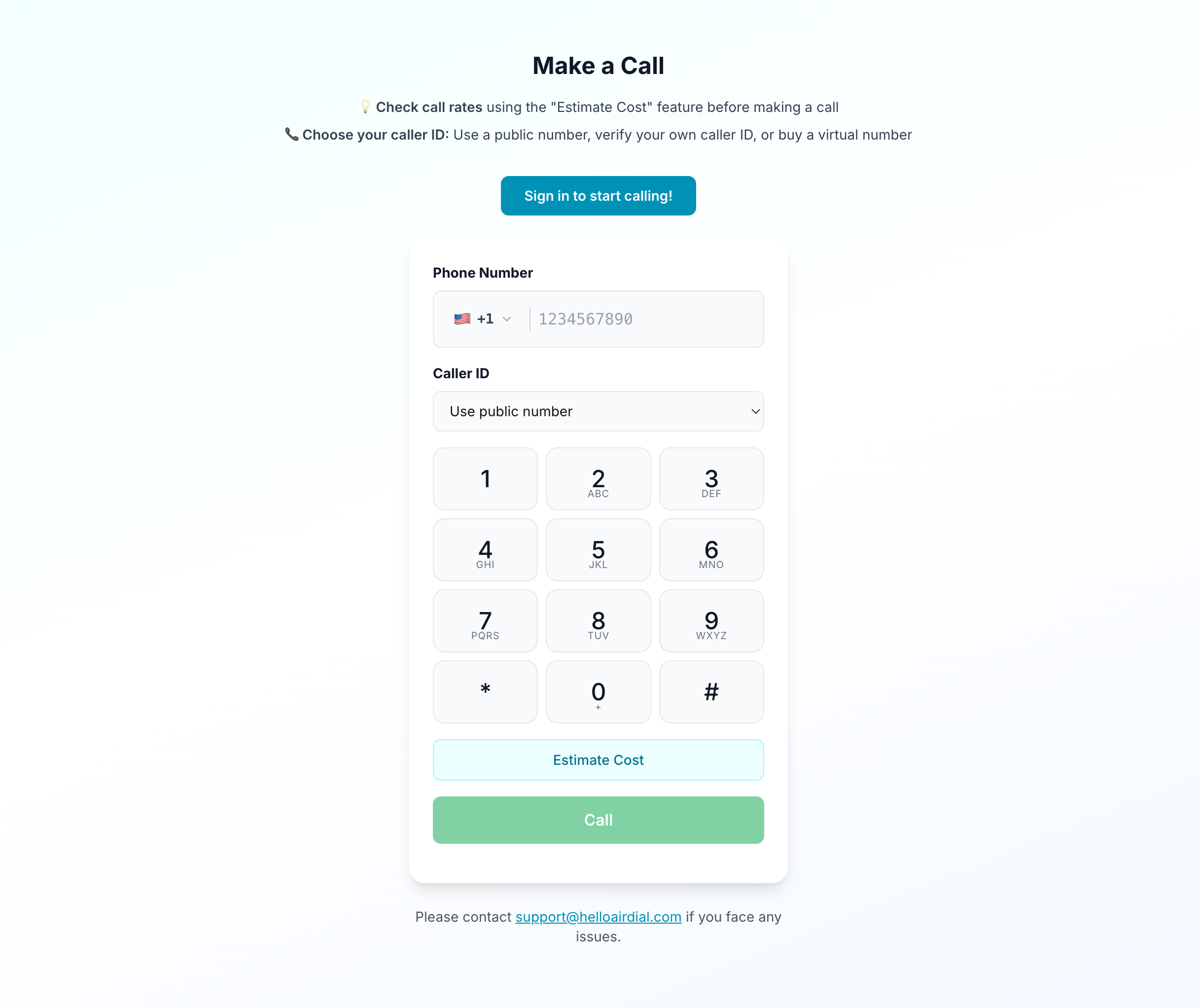
When you click "Call" on a WebRTC-based service, your browser first asks for permission to access your microphone. You've probably seen this popup before - it's a security feature that ensures websites can't secretly listen to you.

Step 2: Finding Each Other (Signaling)

Before two devices can talk directly, they need to exchange information about how to reach each other. This is called "signaling" and works like this:

You (Caller)              Signaling Server              Recipient
     |                          |                           |
     |------- "I want to call" -------->|                   |
     |                          |-------- "Incoming call" -->|
     |                          |<------- "I accept" --------|
     |<-- "Here's how to reach me" -----|                   |
     |                          |                           |

The signaling server is like a matchmaker - it helps both sides find each other, but once connected, it steps out of the way.

Step 3: Punching Through Firewalls (NAT Traversal)

Most people are behind routers and firewalls that block incoming connections. WebRTC uses clever techniques to get around this:

STUN servers help your browser discover its public internet address (like finding out your home's street address when you only know your apartment number).

TURN servers act as a relay when direct connection isn't possible - your audio goes through the server instead of directly to the other person. This adds a tiny bit of delay but ensures the call connects.

About 80-90% of calls connect directly (peer-to-peer), while 10-20% need a relay server.

Step 4: Direct Connection Established

Once both sides know how to reach each other, they establish a direct connection. Your voice now travels:

Your microphone
      ↓
Browser captures audio
      ↓
Compressed using Opus codec (shrinks data by ~90%)
      ↓
Encrypted (DTLS/SRTP)
      ↓
Sent over internet as small data packets
      ↓
Received by other browser/phone
      ↓
Decrypted and decompressed
      ↓
Played through speaker

All of this happens in under 150 milliseconds - fast enough that conversation feels natural.

How HelloAirDial Connects to Regular Phones

When you call a regular phone number through HelloAirDial, there's one extra step:

Your Browser (WebRTC) → HelloAirDial Gateway → Traditional Phone Network → Recipient's Phone

The gateway translates between WebRTC and the traditional phone system, so you get the benefits of browser-based calling while reaching anyone with a phone number.

Learn More

For a visual explanation of how WebRTC works, watch this excellent overview:

More video resources:

For developers looking to implement WebRTC:

When to Use WebRTC: Use Cases

WebRTC has become the foundation for countless real-time communication applications.

Video Conferencing

This is the most visible use case. Apps like Zoom, Google Meet, Microsoft Teams, and Discord all use WebRTC for browser-based video calls.

Why WebRTC works well here:

  • Low latency for natural conversation
  • Adaptive quality based on network conditions
  • No software installation required
  • Works across devices and operating systems

Voice Calling and VoIP

WebRTC powers browser based phone calls, enabling businesses and consumers to make phone calls from Chrome, Firefox, Safari, or any modern browser:

  • International calling from any browser - check rates for 200+ countries
  • Contact center solutions where agents take calls in a web app
  • In-app calling for customer support widgets

Advantages over traditional VoIP:

  • No softphone installation needed
  • Works behind most firewalls
  • HD audio quality with Opus codec

Live Streaming and Broadcasting

While CDN-based streaming (HLS, DASH) dominates large-scale broadcasts, WebRTC enables:

  • Ultra-low-latency streaming (under 500ms vs 10-30 seconds for HLS)
  • Interactive live streams where viewers can participate
  • Watch parties with synchronized playback

Screen Sharing and Collaboration

WebRTC's getDisplayMedia API enables screen sharing for:

  • Remote desktop support
  • Collaborative document editing
  • Live coding sessions
  • Online education and training

Gaming and Interactive Entertainment

Low-latency data channels support:

  • Real-time multiplayer game state synchronization
  • Voice chat in gaming platforms
  • Cloud gaming (though dedicated protocols often perform better)

IoT and Smart Devices

WebRTC runs on embedded systems, enabling:

  • Smart doorbell video feeds
  • Baby monitor apps
  • Security camera live viewing
  • Drone video streaming

Telehealth and Remote Medicine

Healthcare applications use WebRTC for:

  • Doctor-patient video consultations
  • Remote patient monitoring
  • Medical device data streaming
  • Second opinions and specialist consultations

HIPAA-compliant WebRTC implementations add additional encryption and access controls.

File Sharing and P2P Applications

The RTCDataChannel enables:

  • Direct file transfers without server storage
  • P2P CDNs that reduce server load
  • Collaborative real-time document editing

WebRTC vs Traditional Calling Methods

Here's how WebRTC stacks up against other communication technologies.

Comparison Table

FeatureWebRTCPSTN (Traditional Phone)SIP/VoIPProprietary Apps
CostVery LowHigh (especially international)Low-MediumLow-Medium
Audio QualityHD (Opus codec)NarrowbandHD capableVaries
Video SupportNativeNoOptionalUsually yes
LatencyVery Low (under 150ms)LowLow-MediumVaries
Browser SupportYes (native)NoRequires plugin/appRequires app
EncryptionMandatoryNoneOptionalVaries
Firewall TraversalExcellent (ICE/TURN)N/AProblematicUsually good
Setup RequiredNonePhone lineSIP clientApp download
Emergency Calls (911)LimitedFull supportLimitedLimited

What's the Difference Between VoIP, SIP, and WebRTC?

This confuses a lot of people. Here's the simple explanation:

  • VoIP is the broad category - any voice call sent over the internet instead of phone lines
  • SIP is one protocol for VoIP - used by traditional business phone systems
  • WebRTC is another protocol for VoIP - used by browser-based calling services

Think of it like this: VoIP is like "video streaming" as a concept. SIP and WebRTC are different ways to do it, like how Netflix and YouTube both stream video but use different technology.

Examples of SIP-based VoIP:

  • Cisco phone systems
  • RingCentral, Vonage, 8x8 (business phone services)
  • Softphones like Zoiper or Bria
  • Most desk phones in offices

Examples of WebRTC-based VoIP:

  • HelloAirDial (browser-based international calling)
  • Google Meet, Zoom (browser versions)
  • Discord, Facebook Messenger calls
  • WhatsApp Web calls

HelloAirDial is a VoIP service that uses WebRTC instead of SIP, allowing you to make calls directly from your browser without installing any software.

When to Use Each Technology

Use WebRTC when you need:

  • Browser-based calling with no downloads
  • Video conferencing or screen sharing
  • Low-cost international calls
  • Real-time features in web or mobile apps
  • Mandatory encryption for security

Use traditional PSTN when you need:

  • Reliable 911 emergency services with location data
  • Calls during internet outages
  • Universal compatibility (anyone with a phone)
  • Regulatory compliance in certain industries

Use SIP/VoIP when you need:

  • Business phone systems with desk phones
  • Call center infrastructure with advanced routing
  • Integration with existing PBX (Private Branch Exchange) phone systems
  • Bulk calling or high call volumes

Hybrid Approaches

Modern communication platforms often combine:

  1. WebRTC for the web interface - Browser-based calling and video
  2. SIP/PSTN gateways - Connect to traditional phone numbers
  3. Mobile SDKs - Native app experiences on iOS/Android

This hybrid model gives you the best of both worlds: WebRTC's flexibility and low cost with PSTN's universal reachability. For a deeper dive into how these technologies compare, see our VoIP vs Traditional Phone comparison.

The Bottom Line

For most people making international calls to family or friends, WebRTC (like HelloAirDial) is the simplest and cheapest option - just open a browser and call.

For businesses needing full phone systems with desk phones and call routing, SIP/VoIP makes more sense.

PSTN is best kept as a backup for emergencies or areas with poor internet.

Is Browser Calling Secure?

One of the most common questions we get is whether making calls through a web browser is actually secure. The short answer: yes, and in many ways it's more secure than traditional phone calls.

How WebRTC Protects Your Calls

WebRTC was designed with security as a core requirement, not an afterthought. Every WebRTC call is protected by:

Mandatory Encryption

Unlike traditional phone calls that travel unencrypted over phone networks, WebRTC uses two layers of encryption:

  • DTLS (Datagram Transport Layer Security) - Secures the initial handshake and key exchange between callers
  • SRTP (Secure Real-time Transport Protocol) - Encrypts the actual voice and video data

This encryption is always on. You can't disable it, and neither can we. Your conversations stay private.

No Data Storage

WebRTC is designed for real-time communication. Your voice data streams directly between endpoints and isn't stored on servers. Once your call ends, there's no recording sitting on a server somewhere.

Browser Security Model

When you make a call through your browser, you benefit from years of browser security development:

  • Browsers explicitly ask for microphone permission before any call
  • You can see when your microphone is active (browser indicators)
  • Calls run in a sandboxed environment, isolated from other browser activity
  • HTTPS ensures you're connected to the real HelloAirDial site

Browser Calling vs Traditional Phones

Security AspectBrowser Calling (WebRTC)Traditional Phone (PSTN)
Voice encryptionAlways encrypted (SRTP)Usually unencrypted
Eavesdropping riskVery difficultEasier with right equipment
Man-in-middle attacksProtected by DTLSVulnerable
Permission controlsExplicit browser promptsNone
Call metadataMinimalExtensive carrier records

Tips for Secure Calling

To maximize your security when making browser calls:

  • Use a trusted network - Avoid public WiFi for sensitive calls, or use a VPN
  • Keep your browser updated - Security patches protect against vulnerabilities
  • Check the URL - Make sure you're on the real helloairdial.com (look for HTTPS)
  • Review permissions - Only grant microphone access to sites you trust

The bottom line: browser-based calling through WebRTC is a secure way to make international calls. The technology was built by Google and standardized by the W3C and IETF with security as a fundamental requirement, not a bolt-on feature.

Getting Started with WebRTC Calling

For End Users: Making Your First Call

You don't need to understand the technical details to benefit from WebRTC. Whether you want to make phone calls from Chrome, Firefox, Safari, or Edge, the process is the same. Here's how to start:

With HelloAirDial:

  1. Open any modern browser - Chrome, Firefox, Safari, or Edge
  2. Visit helloairdial.com - Works on desktop and mobile
  3. Allow microphone access - Your browser will prompt you
  4. Enter the phone number - Include country code (e.g., +91 for India) - see our country calling guides for help
  5. Add credit and call - Pay only for what you use - view current rates

That's it. WebRTC handles the rest: finding the best connection path, encoding your voice in HD quality, encrypting everything, and connecting to the recipient's phone.

Tips for Best Call Quality

  • Use WiFi when possible - More stable than cellular data
  • Use headphones or earbuds - Prevents echo feedback
  • Close bandwidth-heavy apps - Streaming video can affect call quality
  • Choose a quiet environment - WebRTC has noise suppression, but a quiet room helps
  • Check your internet speed - 3+ Mbps recommended for optimal quality

Minimum Requirements

RequirementMinimumRecommended
Internet Speed1 Mbps3+ Mbps
BrowserChrome 56+, Firefox 44+, Safari 11+, Edge 79+Latest version
DeviceAny with microphoneWith headphones

Browser Support and Compatibility

WebRTC is now supported by all major browsers, though implementation details vary slightly.

Current Browser Support

BrowserSupport LevelNotes
ChromeFullReference implementation
FirefoxFullStrong privacy features
SafariFull (since v11)iOS support included
EdgeFullChromium-based since 2020
OperaFullChromium-based
Samsung InternetFullAndroid default browser

For detailed compatibility data, see Can I Use WebRTC.

Mobile Support

  • iOS Safari - Full support since iOS 11
  • Chrome for Android - Full support
  • Firefox for Android - Full support
  • WebView - Supported in modern Android WebViews

Known Limitations

  • iOS browsers other than Safari - Must use Safari's WebRTC engine (Apple restriction)
  • Older Android WebViews - May have incomplete support
  • Some corporate networks - May block UDP, requiring TURN relay

How HelloAirDial Uses WebRTC

At HelloAirDial, we use WebRTC to deliver affordable, high-quality international calls directly from your web browser.

Browser-Based Calling

With HelloAirDial, you can call any phone number worldwide without:

  • Downloading any software
  • Installing browser plugins
  • Creating complex accounts
  • Signing long-term contracts

Just open your browser, enter a number, and call. WebRTC handles the real-time audio transmission while our infrastructure connects your call to traditional phone networks worldwide. You can start calling right now or check rates for your destination country.

Benefits for Users

BenefitHow WebRTC Enables It
No downloadsWebRTC is built into your browser
Works anywhereCall from any device with a browser
Crystal-clear audioOpus codec provides HD voice quality
Secure callsMandatory DTLS/SRTP encryption
Low latencyDirect peer connections when possible
Firewall-friendlyICE/TURN traverses most network restrictions

Security at HelloAirDial

We build on WebRTC's security foundation:

Security FeatureWhat It Means For You
End-to-end encryptionYour voice is encrypted from your browser to our gateway
No call recordingWe don't record or store your conversations
Secure payment processingPayments handled by Stripe, never stored on our servers
HTTPS everywhereAll connections to our site are encrypted
No account requiredLess personal data to protect means less risk

WebRTC Call Quality

WebRTC call quality is excellent, often surpassing traditional phone calls. The adaptive bitrate technology keeps your calls clear even when network conditions fluctuate. The Opus codec (the same one used by Discord and other major platforms) delivers wideband audio that makes voices sound natural and clear.

What affects WebRTC call quality:

  • Internet speed - 3+ Mbps recommended for HD audio
  • Network stability - WiFi generally outperforms cellular
  • Device quality - A decent microphone makes a difference
  • Browser - Modern browsers are optimized for WebRTC performance

Ready to try WebRTC calling? Try HelloAirDial and make your first international call in under 2 minutes.

Glossary

PSTN (Public Switched Telephone Network) - The traditional phone system that has been around for over a century. It's the network of copper wires, fiber optic cables, and switching centers that connects landlines and routes calls through telephone companies like AT&T and Verizon.

VoIP (Voice over Internet Protocol) - Technology that transmits voice calls over the internet instead of traditional phone lines. Skype, WhatsApp calls, and Zoom audio all use VoIP.

SIP (Session Initiation Protocol) - A signaling protocol used to set up and manage VoIP calls. Many business phone systems and softphones use SIP to connect to VoIP providers.

CDN (Content Delivery Network) - A network of servers distributed globally that delivers content to users from the nearest location. For streaming, CDNs help reduce latency and handle large audiences, though they typically add more delay than WebRTC.

PBX (Private Branch Exchange) - A private telephone network used within a company or organization. It allows internal calls between employees without using external phone lines, and connects to the outside phone network for external calls. Modern PBX systems can be hardware-based or cloud-hosted.

References and Further Reading

Official Specifications

Developer Resources

Tools and Testing

  • WebRTC Internals - Type chrome://webrtc-internals in Chrome's address bar to debug WebRTC
  • Test WebRTC - Test your WebRTC setup
  • Trickle ICE - Test STUN/TURN servers

Browser Compatibility


Last updated: December 28, 2025. Technical specifications based on current W3C and IETF standards. Browser support data from caniuse.com.

Frequently Asked Questions

Is WebRTC free to use?

Yes, WebRTC is open-source and free. There are no licensing fees to use the technology. However, building a production application requires signaling servers and potentially TURN relay servers, which have hosting costs.

Which browsers support WebRTC?

All modern browsers support WebRTC: Chrome, Firefox, Safari, Edge, and Opera. Mobile browsers including iOS Safari and Chrome for Android also have full support. See Can I Use for detailed compatibility.

Is WebRTC secure?

Yes, very secure. WebRTC mandates encryption, and you can't turn it off. All media streams are encrypted using SRTP (Secure Real-time Transport Protocol), and key exchange uses DTLS (Datagram TLS). This makes WebRTC calls more secure than traditional phone calls.

Do I need special equipment for WebRTC calls?

No special equipment required. Any device with a microphone and a modern web browser works. For best quality, headphones or earbuds help prevent echo, but they're not mandatory.

How does WebRTC compare to regular phone calls?

WebRTC offers HD audio quality (compared to narrowband for PSTN), mandatory encryption (PSTN has none), video capability, and significantly lower costs for international calls. Traditional phones have the advantage of 911 emergency services and working without internet.

Does the person I'm calling need WebRTC?

No. When you use HelloAirDial, your WebRTC call connects to our gateway, which then connects to the traditional phone network. The recipient receives a normal phone call and doesn't need any special software or technology.

Will WebRTC work on my corporate network?

Usually yes. WebRTC's ICE framework is designed to work behind NATs and most firewalls. If direct connections are blocked, TURN relay servers provide a fallback path. Very restrictive networks that block all UDP traffic may require additional configuration.

Can WebRTC be used for emergency calls (911)?

WebRTC has limited support for emergency services. Unlike traditional phones, WebRTC doesn't automatically provide location information to emergency dispatchers. For emergencies, a traditional phone or mobile device is recommended.

Tags

webrtcvoiptechnologyreal-time communicationbrowser callingpeer-to-peerinternational callsvideo conferencingbrowser based phone callswebrtc call quality

Ready to make affordable international calls?

Try HelloAirDial today - no subscriptions, just pay-as-you-go rates.

Start Calling Now